
Magento 2: How to Add Additional Text Based on Selected Shipping Methods in Checkout
Learn how to display custom messages in the Magento 2 checkout page based on the customer's selected shipping method. This approach improves user experience by providing shipping-specific information such as delivery instructions, estimated delivery details, or promotional messages.
Overview
In Magento 2, you may want to show different information depending on the shipping method selected by the customer. For example, you can display special instructions for Free Shipping, estimated delivery details for Table Rate shipping, or any custom message relevant to a specific carrier. In this tutorial, we will create a custom checkout component using KnockoutJS that dynamically displays additional text when a customer selects a shipping method.
Before Adding Custom Shipping Text
By default, Magento 2 only displays available shipping methods without any additional information.

Step 1: Create Template File
Create the following template file:
<div class="free-custom-shipping-info" data-bind="visible: showFreeShippingInfo()" style="display: none;">
    <div class="step-title" data-role="title" data-bind="i18n: 'Free Shipping Information'"></div>
    <p class="desc" data-bind="i18n: 'Here add custom Free shipping text..'"></p>
</div>

<div class="table-rate-custom-shipping-info" data-bind="visible: showTableRateShippingInfo()" style="display: none;">
    <div class="step-title" data-role="title" data-bind="i18n: 'Table Rate Delivery'"></div>
    <p class="desc" data-bind="i18n: 'Here add custom Table Rate shipping text..'"></p>
</div>
Step 2: Create Layout File
Create the checkout layout file to inject the custom component into the shipping section.
<?xml version="1.0"?>
<page layout="1column"
      xmlns:xsi="http://www.w3.org/2001/XMLSchema-instance"
      xsi:noNamespaceSchemaLocation="urn:magento:framework:View/Layout/etc/page_configuration.xsd">
    <body>
        <referenceBlock name="checkout.root">
            <arguments>
                <argument name="jsLayout" xsi:type="array">
                    <item name="components" xsi:type="array">
                        <item name="checkout" xsi:type="array">
                            <item name="children" xsi:type="array">
                                <item name="steps" xsi:type="array">
                                    <item name="children" xsi:type="array">
                                        <item name="shipping-step" xsi:type="array">
                                            <item name="children" xsi:type="array">
                                                <item name="shippingAddress" xsi:type="array">
                                                    <item name="children" xsi:type="array">
                                                        <item name="shippingAdditional" xsi:type="array">
                                                            <item name="component" xsi:type="string">uiComponent</item>
                                                            <item name="displayArea" xsi:type="string">shippingAdditional</item>
                                                            <item name="children" xsi:type="array">
                                                                <item name="custom-shipping-info-wrapper" xsi:type="array">
                                                                    <item name="component" xsi:type="string">Vendor_Extension/js/view/custom-shipping-info</item>
                                                                    <item name="provider" xsi:type="string">checkoutProvider</item>
                                                                    <item name="sortOrder" xsi:type="string">0</item>
                                                                </item>
                                                            </item>
                                                        </item>
                                                    </item>
                                                </item>
                                            </item>
                                        </item>
                                    </item>
                                </item>
                            </item>
                        </item>
                    </item>
                </argument>
            </arguments>
        </referenceBlock>
    </body>
</page>
The layout XML injects a custom KnockoutJS component into the checkout shipping section using the
shippingAdditional display area. This allows Magento to render additional shipping information dynamically based on the selected shipping method.
Step 3: Create JavaScript Component
Create a custom KnockoutJS component to detect the selected shipping method and display the corresponding message.
define([
    'uiComponent',
    'ko',
    'Magento_Checkout/js/model/quote'
], function (Component, ko, quote) {
    'use strict';

    return Component.extend({
        defaults: {
            template: 'Vendor_Extension/custom-shipping-info'
        },

        initObservable: function () {
            this._super();

            this.showFreeShippingInfo = ko.computed(function() {
                var method = quote.shippingMethod();

                return method &&
                       method['carrier_code'] === 'freeshipping';
            }, this);

            this.showTableRateShippingInfo = ko.computed(function() {
                var method = quote.shippingMethod();

                return method &&
                       method['carrier_code'] === 'tablerate';
            }, this);

            return this;
        }
    });
});
Step 4: Deploy Static Content & Clear Cache
Run the following Magento commands:
php bin/magento setup:static-content:deploy -f

php bin/magento setup:di:compile

php bin/magento cache:flush
After Adding Custom Shipping Text
Once the customization is completed, Magento will automatically display custom information based on the selected shipping method.
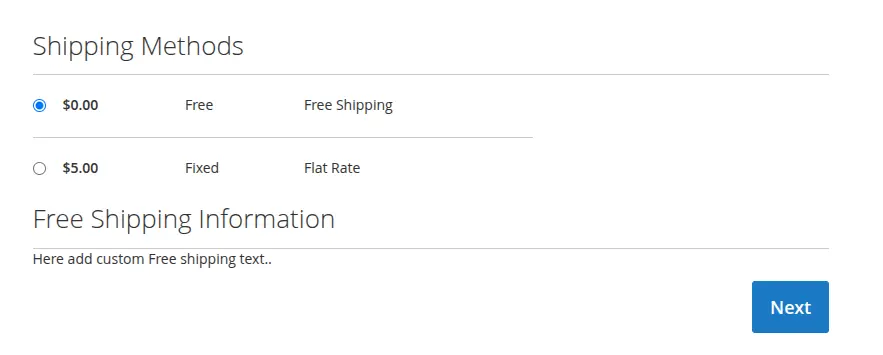
Result
After implementing this customization, you can:
- Display shipping-specific messages dynamically.
- Provide additional delivery instructions to customers.
- Improve checkout user experience.
- Show promotional or shipping-related information.
- Customize checkout behavior without modifying core files.